 RentaDiary
Boarding house management
A boarding house management system that bills each boarder, room by room
Whether you rent whole rooms or individual bedspaces, RentaDiary keeps one record and one bill per boarder, so nobody’s balance gets mixed up with the person in the next bed.
Free plan available. Works on the web and on Android.
Why boarding houses are harder to bill
A boarding house has many small tenants instead of a few large ones. Each pays a different rent, moves in on a different day, and may share a room, a meter, or a bathroom. Utility costs often come from one main meter, and the owner has to decide how to split them.
In a notebook this turns into a grid of crossed-out numbers. Missing one entry means arguing about it at the end of the month.
How RentaDiary handles boarders
You set the house up once, then repeat a short routine each month.
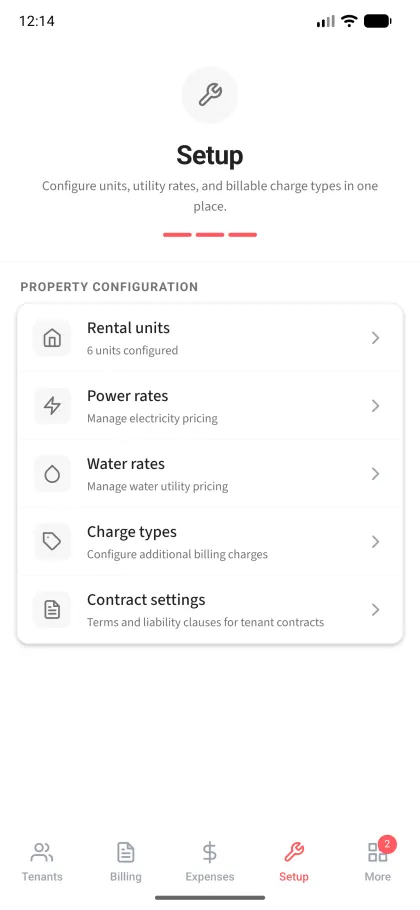
Create a unit for each room
Name it, for example “Room 3” or “Bedspace A2”, give it a rent, and note how many tenants it holds. Add up to three photos if you want a record of the room’s condition.
Add each boarder as a tenant
Every boarder gets their own record with their own monthly rent, due day, deposit, and advance. Several tenants can be assigned to the same unit, and each is billed separately.
Choose how utilities are charged
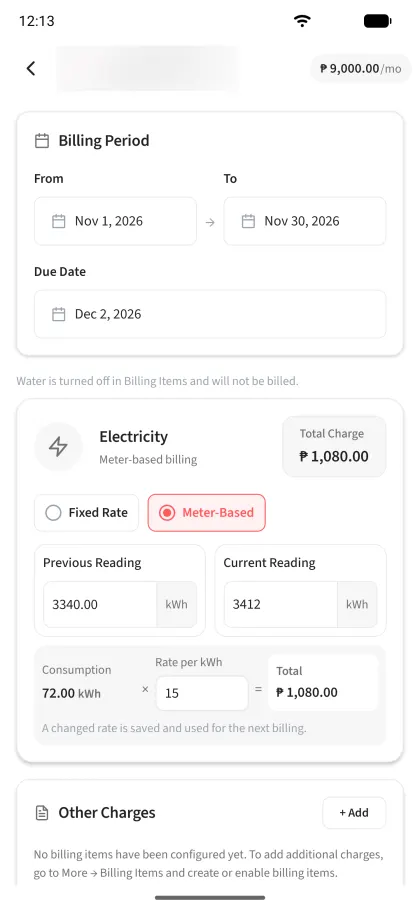
For each boarder, pick a fixed monthly amount for electricity and water, or meter-based billing if they have their own sub-meter.
Create the month’s bills
Set the period and due date, add extras like WiFi, and save. Plus and Pro owners can create many bills at once with bulk billing.
Record what comes in
Log each payment as cash, GCash, or bank transfer. If a boarder pays half, the bill shows the remaining balance until the rest arrives.
A worked example: four boarders, one monthly cycle
Example: Room 3 in a boarding house (illustrative amounts)
| Boarder A: rent | ₱1,500.00 |
|---|---|
| Boarder A: fixed electricity share | ₱250.00 |
| Boarder A: fixed water share | ₱100.00 |
| Boarder A: WiFi fee | ₱100.00 |
| Boarder A: monthly bill | ₱1,950.00 |
Boarders B, C, and D each have their own bill, rent, and balance in the same way. These figures are examples only, not suggested prices.
If Boarder A pays ₱1,000 on the 5th, the bill shows ₱950 outstanding. You record the second payment when it comes and can issue a numbered receipt for each.
Sharing a meter: what to expect
Many boarding houses read one main electric or water meter and split the cost. RentaDiary does not divide a shared meter among several people automatically. There are two practical ways to work with it:
- Fixed monthly share. Work out each boarder’s share yourself, and enter it as their fixed monthly electricity or water amount. Update it when your costs change.
- Sub-meters. If a room or boarder has a sub-meter, bill them on meter-based readings. RentaDiary multiplies the usage by your rate per kWh or per cubic meter. See electricity and water billing for how this works.
What helps a boarding house specifically
Per-boarder balances
FreeEach bill and payment belongs to one tenant, so balances never blend together.
Tenant portal
FreeBoarders can log in, see their own bill, and send a payment screenshot for you to confirm.
Rental agreement with house rules
FreeEdit the contract terms to include your house rules, then have each boarder sign it in the Android app.
Meter reading walk and bulk billing
PlusRecord all readings in one pass with photos, then bill many boarders at once.
Maintenance requests
PlusBoarders report a broken tap or light, and you track it to resolution.
Automatic reminders
ProPayment reminders go out on a schedule instead of by hand.
The Free plan supports up to 5 active tenants. Larger boarding houses need Plus (20 tenants) or Pro (100 tenants).
What it does not do
- No automatic splitting of one meter among several boarders.
- No bed or room availability calendar. Units record who is assigned, not a booking schedule.
- It does not collect rent. Boarders pay you, and you record the payment.
Frequently asked questions
Can I manage bedspaces, not just whole rooms?
Yes. Create a unit for the room, or one unit per bedspace, and assign each boarder as a separate tenant with their own rent and bill.
Can boarders pay by GCash?
Yes, as a payment method. You can save your GCash number and QR code in your payment settings, and boarders can send a screenshot of their transfer for you to confirm. RentaDiary does not move the money.
How many boarders can I add on the Free plan?
Up to 5 active tenants. Plus allows 20 and Pro allows 100.
Can I give boarders a receipt?
Yes. Every recorded payment can produce a numbered receipt image. It is a payment record, not a BIR-registered official receipt.
Bill your boarders without the notebook
Set up your rooms, add your boarders, and send the first round of bills on the Free plan.