 RentaDiary
Digital rental agreements
Digital rental agreements you can sign on your phone
RentaDiary fills a rental agreement from the tenant record, lets you set your own terms, and captures the landlord’s and tenant’s signatures in the Android app. Then you download it as a PDF.
Free plan available. Works on the web and on Android.
Why agreements get skipped
Many small landlords rent on a handshake and a chat message. It works until someone disagrees about the deposit, the due date, the number of occupants, or who pays for water.
A written agreement settles those questions in advance, but typing one from scratch for every tenant is slow, and details like rent and deposit can drift from what you actually bill. RentaDiary builds the agreement from the same tenant record you bill from, so the two always match.
From tenant record to signed agreement
Set your terms once
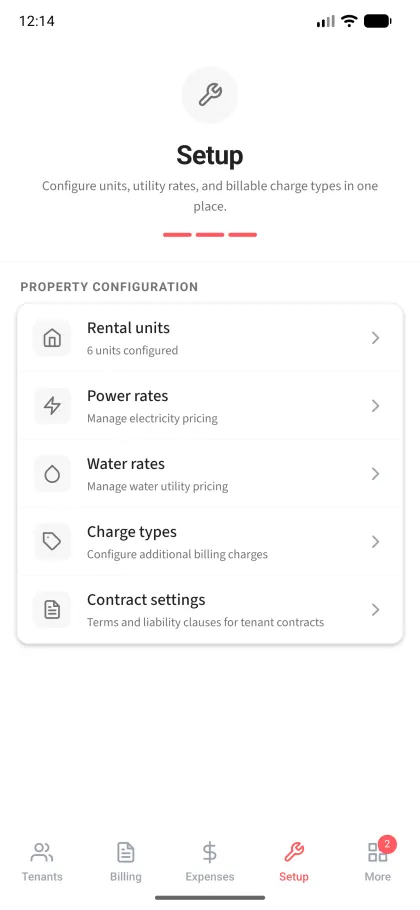
Open Contract Settings and write your terms and conditions and liability clauses. This is your standard wording, such as house rules, deposit conditions, and late-payment terms. It is used for every agreement.
Open the tenant’s agreement
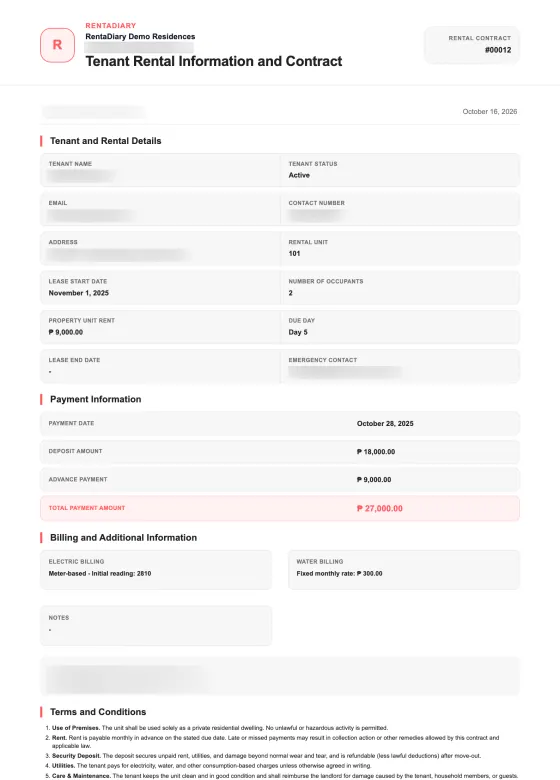
RentaDiary fills in the tenant’s name, contact details, unit, lease start date, number of occupants, monthly rent, due day, deposit, advance payment, and how electricity and water are billed.
Sign on the phone
In the Android app, tap Sign Contract, choose Tenant or Landlord, and draw the signature on the screen. The tenant can sign on your phone in person. Each signature is saved with the signer’s name and the time.
Download the PDF
Download the agreement as an A4 PDF with the signatures included, to keep or print.
What the agreement contains
- Tenant and rental details: name, status, contact information, address, unit, lease dates, occupants, rent, and due day.
- Payment information: payment date, deposit, advance payment, and the total.
- Billing arrangements: whether electricity and water are metered or fixed, with the starting reading or the fixed amount.
- Landlord and property details.
- Your terms and conditions and your liability clauses.
- Late-fee rate and grace days, if you use them.
- Signature blocks for the tenant and the landlord.
Signatures: what to expect
You can save your own signature once in the app, and it fills the landlord’s signature block automatically on every agreement. A signature drawn directly on an agreement takes priority.
Each signature stores the signer’s name and time, along with a fingerprint of what the agreement said when it was signed. If you later change the rent, the terms, or other details, the app shows a warning that the contract was edited after signing and asks both parties to sign again. That way an old signature is not silently attached to new terms.
Agreement generation and PDF download
FreeAvailable on every plan.
Signing in the Android app
FreeLandlord and tenant signatures drawn on the phone, shown on the agreement and in the PDF.
Editable terms and liability clauses
FreeYour own wording applied to every agreement.
Limits to know before you rely on it
- Signing happens in the Android app (Android 7.0 or later), in person on the device. There is no iPhone app. A tenant cannot sign remotely through a link or from the tenant portal.
- Signatures are drawn images with a name and timestamp. RentaDiary does not verify identity or provide a certified e-signature or notarization.
- The default terms are a starting template. Review them, and check with a lawyer or local housing rules if you need the agreement to meet legal requirements in your area.
- The web app displays and prints agreements with signatures. Capturing new signatures is done in the Android app.
Frequently asked questions
Is the digital signature legally binding?
That depends on local law and on the agreement itself, and RentaDiary cannot give legal advice. Signatures here are drawn on the screen with a name and time, and are not a certified e-signature service. Ask a lawyer if you need certainty.
Can my tenant sign from home?
Not at the moment. The tenant signs on the owner’s Android phone. The tenant portal does not offer signing.
Can I use my own terms?
Yes. Edit the terms and conditions and the liability clauses in Contract Settings, and they are applied to every agreement.
What if I change the rent after signing?
The app warns that the contract was edited after signing and asks both parties to sign again.
Is the agreement included in the Free plan?
Yes. Agreement generation, signing in the Android app, and PDF download are available on the Free plan.
Put your rental terms in writing
Set your terms once, then generate and sign an agreement for each tenant.