 RentaDiary
Rent billing software
Rent billing software that turns each month into one clear statement
Pick a period, enter the readings, and RentaDiary builds the bill: rent, utilities, extras, payments, and the balance. Send it as a statement your tenant can understand.
Free plan available. Works on the web and on Android.
Why monthly billing takes so long by hand
Writing a bill is easy. Writing twenty of them, with different rents, different meter readings, an extra charge for one tenant and a credit for another, is where mistakes creep in.
The usual failure points are all small: a reading copied wrongly, a rate that changed last month, an old balance forgotten, or a total that nobody can explain when a tenant asks. Tenants who cannot see how a bill was built are the ones who dispute it.
How a RentaDiary bill is built
Every bill follows the same layout, so tenants learn to read it once.
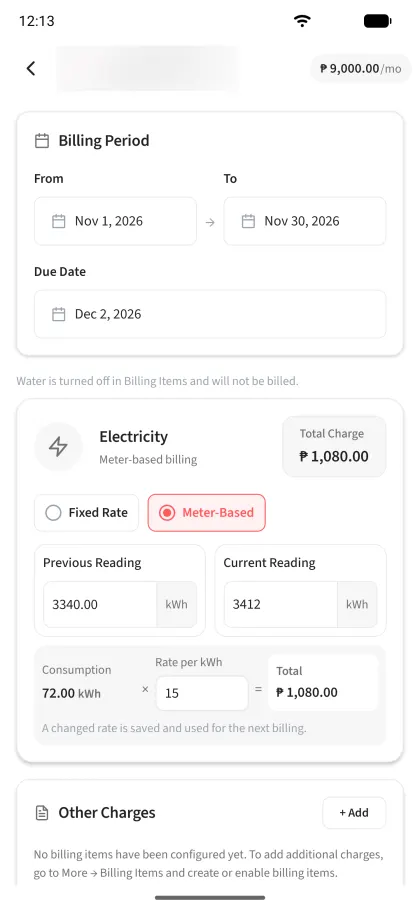
Billing period and due date
Choose the dates the bill covers and the date payment is due. A monthly period is the most common, but you set the dates.
Unit rent
Taken from the tenant record, so you do not retype it every month.
Electricity and water
Either a fixed monthly amount or a metered charge from the previous and current readings. If you do not charge for one of them, switch it off in Billing Items and it will not appear.
Other charges
Add billing items you have set up, such as internet, garbage, cleaning, maintenance, or parking fees.
Totals and balance
The bill shows the total amount, what has been paid, and the outstanding balance, and updates as payments are recorded.
What the statement shows the tenant
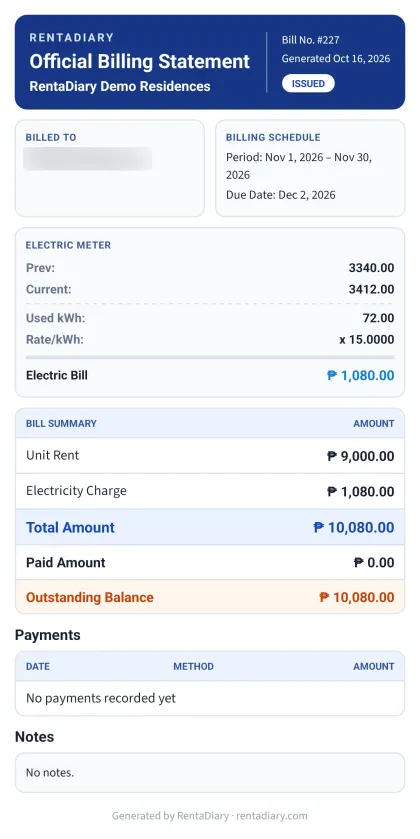
The statement is a document you can download and send. It names the tenant, shows the billing period and due date, lists the electric meter readings and the rate, summarizes the charges, and shows payments recorded so far and the outstanding balance.
Because the working is on the page, there is less to explain. A tenant who asks “why is this ₱1,080?” can see 72 kWh at ₱15 per kWh.
Keep track of every bill
The billing screen lists bills with the tenant, period, status, and outstanding amount.
Bill statuses
FreeSee at a glance which bills are paid, partially paid, or still unpaid, and hide paid bills to focus on what needs follow-up.
Search by tenant
FreeFind any tenant’s bills by name.
Billing statements
FreeDownload the statement for any bill to send to the tenant.
Bulk billing
PlusCreate bills for many tenants in one pass when your whole building bills on the same cycle.
CSV export
ProExport your records to a spreadsheet for your own bookkeeping.
Custom charges and billing item management
ProType in a one-off charge while creating a bill, and change or delete the billing items you set up. Every plan can still add billing items and put them on a bill.
Statements, not tax invoices
RentaDiary generates billing statements and payment receipts as records between you and your tenant. They are not BIR-registered invoices or official receipts. If you are required to issue registered invoices, check what your registration requires before relying on these documents for that purpose.
RentaDiary does not email bills to tenants automatically. You download the statement and send it yourself, or tenants view it in the portal.
Frequently asked questions
Does RentaDiary create invoices?
It creates billing statements: itemized bills with rent, utilities, extra charges, payments, and balance. They are not BIR-registered invoices.
Can I charge something other than rent and utilities?
Yes. Set up billing items such as internet, garbage, cleaning, maintenance, or parking fees, and add them to a bill.
What if a tenant pays only part of a bill?
Record the partial payment. The bill stays open with the remaining balance, and the payment history shows each amount received.
Can I bill many tenants at once?
Yes, bulk billing is available on the Plus and Pro plans. On the Free plan you create bills one tenant at a time.
Send a bill your tenant can actually read
Create your first bill on the Free plan and download the statement.