 RentaDiary
Tenant management software
Tenant management software that keeps each tenant’s whole history in one place
Contact details, lease start, rent, due day, deposit, bills, and payments all live on one tenant record. Open a name and see exactly where they stand.
Free plan available. Works on the web and on Android.
The problem with scattered tenant information
When a tenant’s details are spread across your phone contacts, a rent notebook, and old message threads, simple questions become slow. When did they move in? How much deposit did they pay? Did they ever pay the electricity bill in full?
It gets harder when a tenant leaves or a dispute starts. You need dates, amounts, and receipts, and you need them without searching through months of chats.
What a tenant record holds
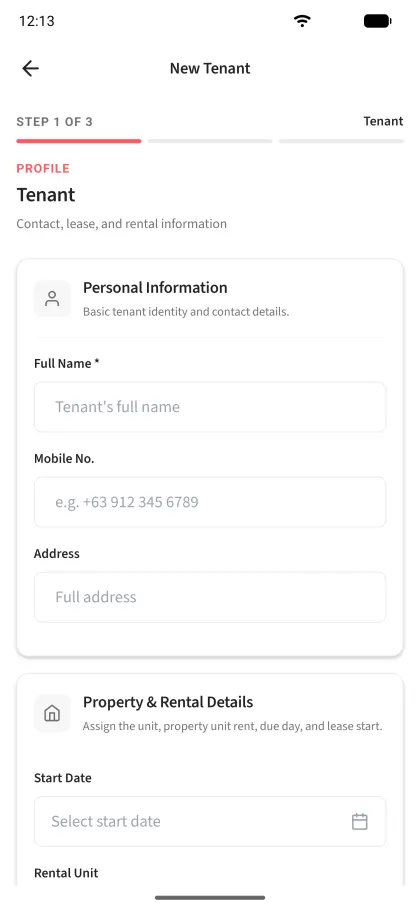
Creating a tenant in RentaDiary takes three short steps. Here is what you can record.
- Who they are: full name, mobile number, and address.
- Where they live: the rental unit, start date, and number of occupants.
- What they pay: monthly rent, the day of the month it is due, security deposit, and advance payment.
- How utilities are billed: a fixed monthly amount or meter-based billing for electricity and for water, with the meter ID and starting readings.
- Notes: anything you want to remember about the tenancy.
Once saved, the tenant’s bills, payments, receipts, and agreement all attach to this record.
Day-to-day use
Find a tenant quickly
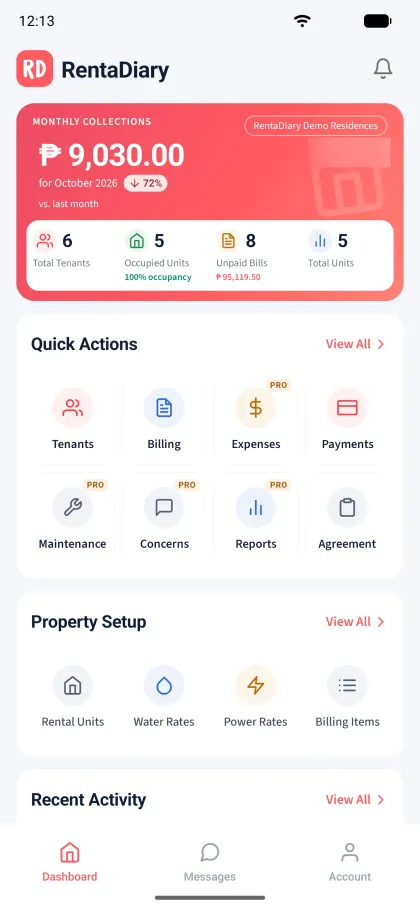
Search by name or contact number. The tenant list shows how many are active, how much is outstanding, and how many are overdue.
Check where they stand
Open the tenant to review their bills and payment history. Each bill shows what was charged, what was paid, and what is still owed.
Prepare the paperwork
Generate the rental agreement from the same record, with the rent, deposit, due day, and utility terms already filled in.
Handle a move-out
Archive a tenant who has left. Their history is kept, but they no longer count toward your active tenant limit.
A portal for tenants
Each tenant can have a login to the RentaDiary tenant portal. They can see their latest bill and their billing history, check payments, and send a payment confirmation, such as a GCash screenshot, for you to review.
Tenants can also submit maintenance requests and concerns through the portal. You reply and update the status, and both of you keep a record of what was said. Maintenance requests and concerns are part of the Plus plan.
Plans and limits
Tenant limits count active tenants only.
Up to 5 active tenants
FreeTenant records, billing, payments, receipts, agreements, and the tenant portal.
Up to 20 active tenants
PlusAdds maintenance requests and concerns, expenses, reports, and bulk billing.
Up to 100 active tenants
ProAdds tenant messaging in the Android app, advanced reports, and automatic reminders.
Limits to know about
- RentaDiary does not screen tenants or run background or credit checks.
- Tenant records hold the details you type in. It does not verify IDs or documents.
- Rental agreements are generated from your own terms. Check them against local rules or with a lawyer if you need legal advice.
Frequently asked questions
How many tenants can I manage?
The Free plan allows up to 5 active tenants, Plus up to 20, and Pro up to 100. Archived tenants do not count toward the limit.
Can a tenant see my other tenants’ information?
No. A tenant logs in to their own portal and sees only their own bills, payments, and requests.
What happens to a tenant’s records when they move out?
Archive the tenant. Their bills, payments, and receipts stay on record, so you can still look them up later.
Can I record deposits and advance payments?
Yes. Each tenant record has fields for the security deposit and the advance payment, and both appear on the rental agreement.
Give every tenant a proper record
Add your first tenant on the Free plan and see how much easier the monthly routine becomes.