 RentaDiary
Rent payment tracking
Rent payment tracking that shows who paid, how much, and what is still owed
Record each payment against the bill it covers. RentaDiary keeps the balance, the payment history, and a numbered receipt for every tenant.
Free plan available. Works on the web and on Android.
The trouble with payments you cannot trace
Rent arrives in different forms: cash handed over, a GCash transfer, a bank deposit, a screenshot sent in chat. If the only record is your memory and your phone’s message history, you will eventually disagree with a tenant about what was paid.
Partial payments make it worse. A tenant pays ₱5,000 of a ₱8,000 bill. Unless that is written down against that bill, the remaining ₱3,000 gets forgotten or argued about.
How payments are recorded
Pick the bill
Open the tenant’s bill that the money is for. Payments are attached to a specific bill and period, not just to the tenant.
Enter the payment
Record the amount, the date, and the method: cash, GCash, or bank transfer. Add a note if something is unusual.
See the new balance
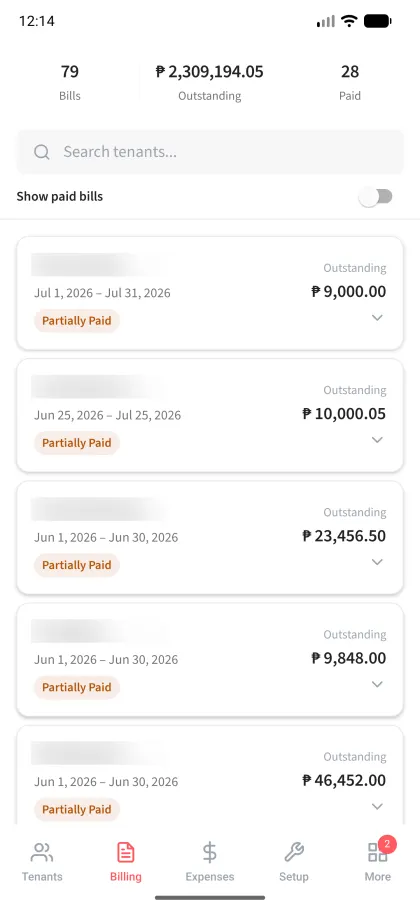
The bill updates to show the amount paid and the outstanding balance, and its status changes to partially paid or paid.
Issue a receipt
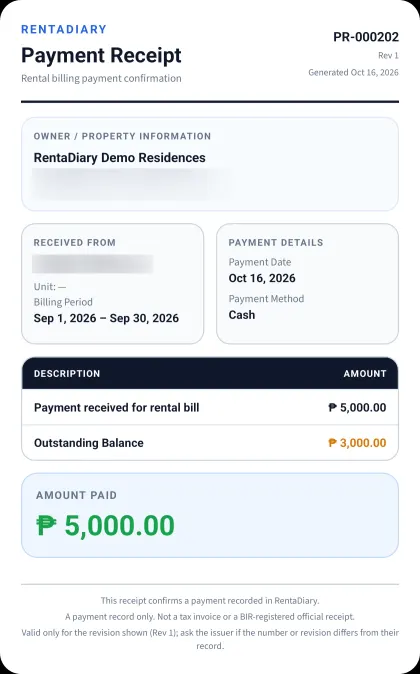
Generate a numbered receipt for the payment and share it with the tenant as an image.
A worked example: a partial payment
Example: one bill, two payments (illustrative amounts)
| Bill total | ₱8,000.00 |
|---|---|
| Payment 1 (GCash, on the 5th) | ₱5,000.00 |
| Balance after payment 1 | ₱3,000.00 |
| Payment 2 (cash, on the 20th) | ₱3,000.00 |
| Balance after payment 2 | ₱0.00 |
The bill is never edited to “fit” the payment. The total stays ₱8,000 and the payments accumulate against it, so the history stays honest.
When tenants pay online
If you accept GCash, save your GCash number and QR code in your payment settings. A tenant who pays can open the tenant portal and send a payment confirmation with the amount and a screenshot of the transfer.
That submission is a request for you to review, not a recorded payment. Compare it with your own GCash or bank record. If it matches, confirm it and RentaDiary records the payment against the bill. If not, reject it with a note. Nothing changes the balance until you confirm.
Receipts and reminders
Numbered payment receipts
FreeEach receipt has its own number and revision, the tenant, billing period, payment method, amount paid, and the outstanding balance.
Review of tenant payment confirmations
FreeConfirm or reject submitted proofs of payment, with a note.
Manual payment reminders
FreeSend a reminder to a tenant whose bill is unpaid.
Reports
PlusSee monthly income and collection rates to judge how the month went.
Aging analysis and automatic reminders
ProSee overdue balances grouped by how late they are, and let reminders go out on a schedule.
What it does not do
- RentaDiary does not process payments or hold your money. Tenants pay you directly.
- It does not connect to your bank or GCash account, so you confirm payments yourself.
- Receipts are payment records, not BIR-registered official receipts.
Frequently asked questions
Can I record partial payments?
Yes. Each payment is recorded against the bill. The bill stays open until the payments add up to the total.
Which payment methods can I record?
Cash, GCash, and bank transfer.
Does RentaDiary collect rent online?
No. Tenants pay you by cash, GCash, or bank transfer. They can send proof of an online payment through the tenant portal, and you confirm it after checking your own records.
Are the receipts official receipts?
They are numbered payment records you can give to a tenant. They are not BIR-registered official receipts or tax invoices.
How do I see who has not paid?
The billing screen shows each bill’s status and outstanding amount, and you can hide paid bills to focus on the rest. The tenant list also shows the total outstanding and the number of overdue tenants.
Know what every tenant owes
Record your next payment in RentaDiary and see the balance update.